
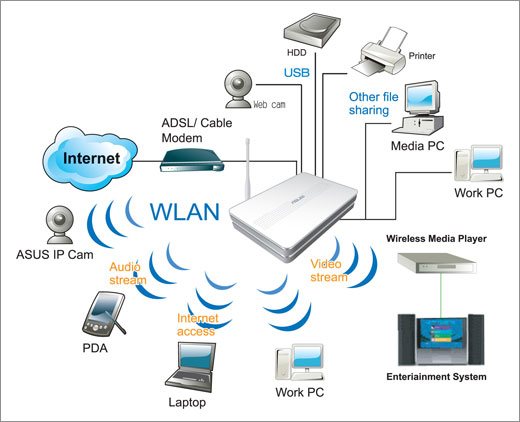
IEEE 802.11n is a proposed amendment to the IEEE 802.11-2007 wireless networking standard to significantly improve network throughput over previous standards, such as 802.11b and 802.11g, with a significant increase in the maximum raw (PHY) data rate from 54 Mbit/s to a maximum of 600 Mbit/s. The current state of the art supports a PHY rate of 450 Mbit/s, with the use of 3 spatial streams at a channel width of 40 MHz[1]. Depending on the environment, this may translate into a user throughput (TCP/IP) of 110 Mbit/s.
IEEE 802.11n builds on previous 802.11 standards by adding multiple-input multiple-output (MIMO) and Channel-bonding/40 MHz operation to the physical (PHY) layer, and frame aggregation to the MAC layer.
MIMO uses multiple transmitter and receiver antennas to improve the system performance. MIMO is a technology which uses multiple antennas to coherently resolve more information than possible using a single antenna. Two important benefits it provides to 802.11n are antenna diversity and spatial multiplexing.
MIMO technology relies on multipath signals. Multipath signals are the reflected signals arriving at the receiver some time after the line of sight (LOS) signal transmission has been received. In a non-MIMO based 802.11a/b/g network, multipath signals were perceived as interference degrading a receiver's ability to recover the message information in the signal. MIMO uses the multipath signal's diversity to increase a receiver's ability to recover the message information from the signal.
Another ability MIMO technology provides is Spatial Division Multiplexing (SDM). SDM spatially multiplexes multiple independent data streams, transferred simultaneously within one spectral channel of bandwidth. MIMO SDM can significantly increase data throughput as the number of resolved spatial data streams is increased. Each spatial stream requires a discrete antenna at both the transmitter and the receiver. In addition, MIMO technology requires a separate radio frequency chain and analog-to-digital converter for each MIMO antenna which translates to higher implementation costs compared to non-MIMO systems.
Channel Bonding, also known as 40 MHz, is a second technology incorporated into 802.11n which can simultaneously use two separate non-overlapping channels to transmit data. Channel bonding increases the amount of data that can be transmitted. 40 MHz mode of operation uses 2 adjacent 20 MHz bands. This allows direct doubling of the PHY data rate from a single 20 MHz channel. (Note however that the MAC and user level throughput will not double.)
Coupling MIMO architecture with wider bandwidth channels offers the opportunity of creating very powerful yet cost-effective approaches for increasing the physical transfer rate.[citation needed]
![Reblog this post [with Zemanta]](https://lh3.googleusercontent.com/blogger_img_proxy/AEn0k_vD9Y_A-nFHmMnIEv_FdQLv6LeMOab2zzp0ruv7PCAhwD9VQNhAIdsnvpSaGj0RdTkinCbsGtGYTKBCPfuUF8tfSkFablimbs-asaEZ7lz2RpYHWth6-vk0Gcb7JK3sYeM6s4-v4swbQ-lvBF2tftE=s0-d)

![Reblog this post [with Zemanta]](https://lh3.googleusercontent.com/blogger_img_proxy/AEn0k_tKoc5XyhDMtafa3AKhDn7NaYFbXYsP3WIT7w9st5TW1G1PDpB9v-NkgGcmqdpFUpY3AO6MZXSdjzoa6HOgIPLUuB7WcrojCbwt9WdhKrlPYk0s7fiOQbzDD5gnu0RzjCHLOZfanZF6puDAziDfj7Pw=s0-d)


 Posts
Posts


